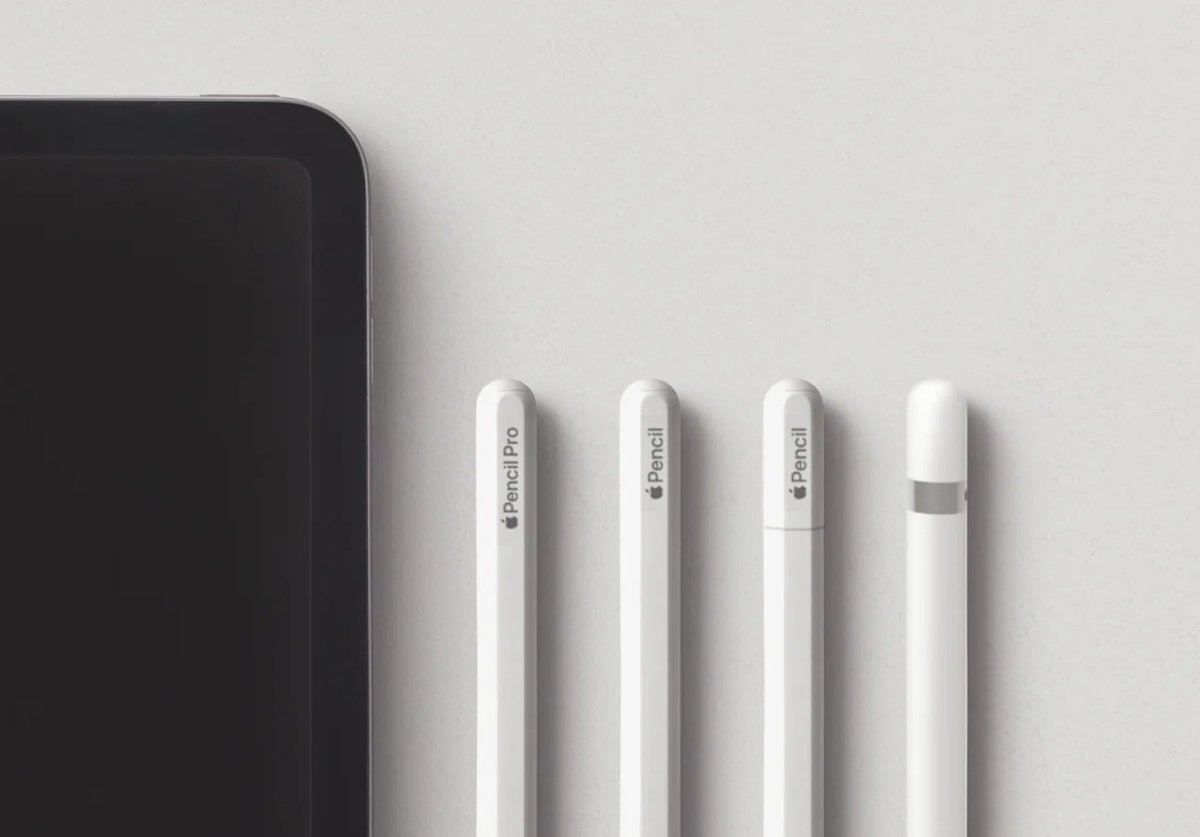
Choosing the right digital tool can transform your iPad into a powerful canvas or an indispensable notepad. But with Apple now offering four distinct Apple Pencil models, understanding the nuances of their features, functionality, and design is key to making the best choice. It's not just about picking the newest or most expensive; it's about finding the one that perfectly complements your iPad and your workflow.
Gone are the days when there was just one Apple Pencil. Today, you'll encounter the original Apple Pencil (1st Gen), the refined Apple Pencil (2nd Gen), the versatile Apple Pencil (USB-C), and the cutting-edge Apple Pencil Pro. Each one is a marvel of technology designed to offer pixel-perfect precision and incredibly low latency, but they diverge significantly in how they charge, pair, feel in your hand, and the advanced capabilities they bring to your fingertips. This guide will cut through the confusion, helping you confidently select the Apple Pencil that’s right for you.
At a Glance: Your Apple Pencil Navigator
Before we dive into the specifics, here are the core takeaways to guide your decision:
- Compatibility is paramount: Your iPad model always determines which Apple Pencil you can use. Check your iPad's model number first (Settings > General > About).
- Four models exist: Apple Pencil (1st Gen), Apple Pencil (2nd Gen), Apple Pencil (USB-C), and Apple Pencil Pro.
- Prices vary: From $79 for the USB-C model to $129 for the 2nd Gen and Pro, and $99 for the 1st Gen.
- All offer core precision: Every Apple Pencil delivers excellent line accuracy and low latency.
- Key differentiators: Charging method, pressure sensitivity, double-tap gesture, hover capability, and the new squeeze/barrel roll/haptic feedback on the Pencil Pro.
- Pressure sensitivity isn't universal: The USB-C model lacks it, making it less ideal for professional artists.
- Magnetic charging is a premium feature: Only found on the 2nd Gen and Pencil Pro.
- No Apple Pencil works with iPhones.
The Golden Rule: iPad Compatibility Dictates All
Think of your iPad as the gatekeeper. Before you even consider features, functionality, and design, you must identify your specific iPad model. Apple has designed its Pencils to work with particular generations and types of iPads, and there's no workaround for this. Trying to force compatibility will only lead to frustration.
To quickly find your iPad model, just head to Settings > General > About and look for the Model Number. Once you have it, you can easily match it against the compatibility lists below.
iPad with a Lightning Connector? Meet Apple Pencil (1st Gen)
If your iPad charges via an older Lightning port, your choice is clear and singular: the Apple Pencil (1st Gen). This includes a wide range of popular models that have served many users well over the years.
Compatible iPad Models:
- iPad (6th, 7th, 8th, 9th Gen)
- iPad mini (5th Gen)
- iPad Air (3rd Gen)
- iPad Pro 9.7-inch
- iPad Pro 10.5-inch
- iPad Pro 12.9-inch (1st & 2nd Gen)
iPad (10th Gen): A Unique Compatibility Story
The 10th-generation iPad represents a bit of a compatibility crossroads due to its transition to USB-C charging for the iPad itself, while the 1st Gen Apple Pencil still uses Lightning. This means you have two options, but one comes with a small asterisk.
Compatible Apple Pencils:
- Apple Pencil (1st Gen): Requires a USB-C cable and a USB-C to Apple Pencil Adapter. Yes, you read that right – an adapter is needed to bridge the gap between your iPad's USB-C port and the 1st Gen Pencil's Lightning connector. This setup can feel a bit clunky, especially for charging.
- Apple Pencil (USB-C): This is the more streamlined option for the 10th Gen iPad, as both the iPad and the Pencil use USB-C for charging and pairing, eliminating the need for adapters.
For a deeper dive into making the right choice for this specific iPad, we've put together a comprehensive iPad 10th Gen Pencil guide that covers all the nuances.
iPad mini (6th Gen), iPad Air (4th & 5th Gen), Older iPad Pro: The Apple Pencil (2nd Gen) Zone
These models embrace the more modern, magnetically attaching Apple Pencil (2nd Gen). This pairing offers a significantly more convenient user experience for charging and storage.
Compatible iPad Models:
- iPad mini (6th Gen)
- iPad Air (4th & 5th Gen)
- iPad Pro 11-inch (1st-4th Gen)
- iPad Pro 12.9-inch (3rd-6th Gen)
The Latest & Greatest: iPad Air (M2) & iPad Pro (M4) Welcome Apple Pencil Pro
If you've recently upgraded to Apple's newest M-series iPads, you'll have access to the most advanced Apple Pencil features. The Apple Pencil Pro is specifically designed to unlock exclusive new capabilities on these cutting-edge devices.
Compatible Apple Pencils:
- Apple Pencil Pro: This is the ultimate companion for these powerful new iPads, offering features like Squeeze, Barrel Roll, and Haptic Feedback.
- Apple Pencil (USB-C): You can also use the more affordable Apple Pencil (USB-C) with these models, though you'll miss out on pressure sensitivity and the Pro's unique functionalities.
Compatible iPad Models: - iPad Air (M2 model)
- iPad Pro (M4 model)
Diving Deep: Features, Functionality & Design of Each Apple Pencil Model
Now that compatibility is squared away, let's unpack the individual merits, drawbacks, and design philosophies behind each Apple Pencil. Understanding these distinctions will help you align your needs with the perfect tool.
Apple Pencil (1st Gen): The Original Innovator
- Price: $99
- Charging/Pairing: This model charges and pairs by plugging its Lightning connector directly into your iPad's Lightning port. For the iPad 10th Gen, it requires a separate USB-C to Apple Pencil Adapter for both charging and pairing.
- Key Features: It offers excellent pixel-perfect precision, remarkably low latency, and crucial pressure sensitivity (allowing for varied line thickness based on how hard you press) and tilt support (for shading effects).
- Design Notes: The 1st Gen has a glossy plastic finish, a removable cap that covers the Lightning connector, and a perfectly cylindrical shape. It does not magnetically attach to any iPad for storage or charging.
- Considerations: Its charging method can be awkward, with the Pencil sticking out from the iPad's port. The removable cap is also notoriously easy to misplace. For the iPad 10th Gen, the adapter adds another layer of complexity and cost. It represents an older design philosophy, though its core drawing capabilities remain robust.
Pros: - Full pressure sensitivity and tilt support.
- More affordable than the 2nd Gen and Pro models.
- Still provides a premium drawing experience for compatible iPads.
Cons: - Clunky charging mechanism (protrudes from iPad).
- Removable cap can be lost.
- No magnetic attachment for storage.
- Requires an adapter for iPad 10th Gen.
- Older design aesthetic.
Apple Pencil (2nd Gen): The Seamless Upgrade
- Price: $129
- Charging/Pairing: This is where the 2nd Gen shines. It charges and pairs wirelessly simply by magnetically attaching to the side of your compatible iPad. This convenience transformed the Apple Pencil experience.
- Key Features: It retains the pixel-perfect precision, low latency, pressure sensitivity, and tilt support of its predecessor. Crucially, it adds a double-tap gesture feature, allowing you to quickly switch tools (e.g., pen to eraser) with a simple tap on the Pencil's flat side.
- Design Notes: The 2nd Gen features a more refined matte finish and a flat edge that allows for magnetic attachment to the iPad. This not only facilitates charging and pairing but also provides a secure and convenient storage solution.
- Considerations: This model represents a significant leap in user experience, making it far more integrated and intuitive for daily use.
Pros: - Magnetic wireless charging and pairing.
- Convenient storage on iPad.
- Full pressure sensitivity and tilt support.
- Double-tap gesture for tool switching.
- Modern, sleek matte design.
Cons: - More expensive than the 1st Gen and USB-C models.
- Only compatible with specific iPad models.
Apple Pencil (USB-C): The Accessible Workhorse
- Price: $79
- Charging/Pairing: This model charges and pairs via a hidden sliding USB-C port at its end. You simply slide open the cap and plug in a USB-C cable. For storage, it magnetically attaches to the side of compatible iPads, but this attachment is only for storage, not charging or pairing.
- Key Features: It offers the core Apple Pencil experience: pixel-perfect precision, low latency, and tilt support. It also supports Apple Pencil hover on compatible iPad Air and iPad Pro models (allowing you to preview a mark before you make it).
- Lacks: The most significant omission is pressure sensitivity, which means your lines will have a uniform thickness regardless of how hard you press. It also lacks the double-tap gesture and magnetic wireless charging.
- Design Notes: Sporting a clean, modern matte finish and a flat side for magnetic attachment, it shares a visual aesthetic with the 2nd Gen, but without the wireless charging capability.
- Pros: Most affordable Apple Pencil. Modern design and magnetic storage (though not charging). Supports Apple Pencil hover on newer iPads. Wide compatibility with USB-C iPads.
Cons: - Lacks pressure sensitivity, a crucial feature for artists.
- No double-tap gesture.
- Magnetic attachment is for storage only, still requires wired charging.
- Sliding cap for USB-C port can be a minor inconvenience.
Apple Pencil Pro: The New Benchmark for Creativity
- Price: $129
- Charging/Pairing: Like the 2nd Gen, the Apple Pencil Pro boasts magnetic wireless charging and pairing, snapping neatly onto the side of compatible iPads.
- Exclusive Compatibility: This is important – the Apple Pencil Pro is exclusively compatible with the M2 iPad Air and M4 iPad Pro models. It is not backward compatible with older iPads, even those that use the 2nd Gen Pencil.
- Key Features: It builds upon the 2nd Gen's capabilities with pixel-perfect precision, low latency, pressure sensitivity, and tilt support. It also includes the double-tap gesture. But the "Pro" designation comes from its groundbreaking new features:
- Squeeze: A new sensor lets you squeeze the barrel of the Pencil to pull up a tool palette, change brushes, or perform quick actions without breaking your stride.
- Barrel Roll: A gyroscope allows you to precisely control the orientation of shaped pen and brush tools by rolling the Apple Pencil in your hand. This is incredibly intuitive for calligraphers and artists.
- Haptic Feedback: Subtle, yet impactful, haptic pulses confirm actions like squeezing, smart shape snapping, and more, making interactions feel even more responsive and natural.
- Find My: Yes, if you misplace your Apple Pencil Pro, you can use the Find My app to locate it.
Pros: - Magnetic wireless charging and pairing.
- Full pressure sensitivity and tilt support.
- Double-tap gesture.
- Exclusive new features: Squeeze, Barrel Roll, Haptic Feedback, and Find My integration.
- The most advanced and integrated Apple Pencil experience.
Cons: - Highest price point (tied with 2nd Gen, but for more features).
- Extremely limited compatibility: Only works with the very latest M2 iPad Air and M4 iPad Pro models.
Side-by-Side: A Quick Comparison of Apple Pencil Features
To help you visualize the differences, here's a comparative table summarizing the core features, functionality, and design elements across all four models:
| Feature | Apple Pencil (1st Gen) | Apple Pencil (2nd Gen) | Apple Pencil (USB-C) | Apple Pencil Pro |
|---|---|---|---|---|
| Price | $99 | $129 | $79 | $129 |
| Charging Method | Lightning (wired) | Magnetic (wireless) | USB-C (wired) | Magnetic (wireless) |
| Pairing Method | Lightning (wired) | Magnetic (wireless) | USB-C (wired) | Magnetic (wireless) |
| Magnetic Storage | No | Yes | Yes (no charging) | Yes |
| Pressure Sensitivity | Yes | Yes | No | Yes |
| Tilt Sensitivity | Yes | Yes | Yes | Yes |
| Double-Tap Gesture | No | Yes | No | Yes |
| Apple Pencil Hover | No | Yes | Yes | Yes |
| Squeeze Gesture | No | No | No | Yes |
| Barrel Roll | No | No | No | Yes |
| Haptic Feedback | No | No | No | Yes |
| Find My Support | No | No | No | Yes |
| Design Finish | Glossy plastic | Matte finish | Matte finish | Matte finish |
| Adapter for iPad 10 | Yes (required) | N/A | No (direct USB-C) | N/A |
Choosing Your Digital Quill: Recommendations by User Need
With a clear understanding of compatibility and features, let's tailor the recommendations based on how you plan to use your Apple Pencil. Your specific needs should always drive the final decision.
For the Aspiring Artist, Professional Illustrator, or Serious Designer
If your primary use involves digital art, detailed illustrations, graphic design, or anything that demands nuanced control over line weight and shading, pressure sensitivity is non-negotiable.
- Apple Pencil Pro: If you own an M2 iPad Air or M4 iPad Pro, this is the ultimate choice. The Squeeze, Barrel Roll, and Haptic Feedback features are game-changers for creative professionals, offering unprecedented control and an even more immersive experience. The "Find My" integration is also a welcome addition for peace of mind.
- Apple Pencil (2nd Gen): For users with compatible iPad Air (4th/5th Gen), iPad mini (6th Gen), or older iPad Pro models, the 2nd Gen remains an outstanding choice. It provides full pressure sensitivity, tilt support, and the convenient double-tap gesture, all with seamless magnetic charging and pairing. It's a powerhouse for artistic creation.
For the Everyday Note-Taker, Student, or Document Annotator
If your main tasks involve handwriting notes, marking up PDFs, signing documents, or basic sketching where variable line thickness isn't critical, you can save some money without sacrificing core functionality.
- Apple Pencil (USB-C): This is often the sweet spot. At $79, it offers pixel-perfect precision, tilt support, and low latency, which are excellent for clear handwriting and accurate annotations. Its modern design and magnetic attachment for storage make it feel premium, and its direct USB-C charging is straightforward. The lack of pressure sensitivity won't be an issue for these tasks.
- Apple Pencil (1st Gen): If you have an older, compatible iPad with a Lightning port (and don't want to deal with the 10th Gen adapter situation), the 1st Gen is a perfectly capable tool for note-taking and document markup. Its pressure sensitivity, while not strictly necessary for basic notes, can be a nice bonus if you occasionally want to add a flair to your handwriting.
For Budget-Conscious Users with Compatible iPads
If every dollar counts, and your needs are straightforward, there are excellent value options available.
- Apple Pencil (USB-C): At $79, it's the most affordable option and provides a modern experience (magnetic storage, USB-C charging) with all the essential features for non-artistic uses. It's a strong recommendation for anyone prioritizing value.
- Apple Pencil (1st Gen): If your iPad is only compatible with the 1st Gen, its $99 price tag makes it the most budget-friendly choice within its compatibility bracket. Just be prepared for the wired charging experience and the potential for a lost cap.
The Student & Classroom Companion
Durability, ease of use, and a lower price point are often key considerations in educational settings.
- Apple Pencil (USB-C): Its robust core features, affordable price, and modern USB-C charging make it an excellent choice for students and classrooms where budget is a factor and advanced artistic features like pressure sensitivity aren't frequently needed.
- Logitech Crayon: This is a strong alternative worth considering. It's often found around $69, offers tilt support, palm rejection, and a durable, flat design that resists rolling off desks. While it lacks pressure sensitivity, it's compatible with a wide range of iPads (including the 10th Gen, Air, Mini, and many Pro models), making it a versatile and budget-friendly option for educational environments.
Exploring Alternatives: Beyond the Apple Ecosystem
While Apple Pencils are meticulously designed to integrate seamlessly with iPads, they aren't your only option. For specific use cases or budget constraints, some third-party styluses offer compelling alternatives.
Logitech Crayon: A Solid Contender
The Logitech Crayon is perhaps the most well-known and respected alternative to the Apple Pencil, and for good reason. It’s designed in collaboration with Apple and utilizes similar underlying technology.
- Price: Typically around $69.
- Key Features: It offers pixel-perfect precision, low latency, and tilt support for shading. Crucially, it also features palm rejection, allowing you to rest your hand on the screen naturally.
- Lacks: Like the Apple Pencil (USB-C), it does not have pressure sensitivity, making it less suitable for professional artists.
- Design: The Crayon has a distinctive flat, almost rectangular design, which prevents it from rolling off desks – a practical benefit, especially in classrooms. It charges via USB-C (or Lightning for older models, depending on the Crayon generation).
- Compatibility: The Logitech Crayon boasts broad compatibility, often working with a wider range of iPads than a single Apple Pencil model. It's compatible with iPad (6th, 7th, 8th, 9th, 10th Gen), iPad mini (5th, 6th Gen), iPad Air (3rd, 4th, 5th Gen), and iPad Pro (11-inch 1st-4th Gen, 12.9-inch 3rd-6th Gen). Always check Logitech's official compatibility list for the most up-to-date information for your specific iPad.
- Best For: Students, note-takers, teachers, and anyone seeking a durable, reliable, and more affordable stylus for non-artistic tasks.
Important Clarifications & Common Questions
Let's address a few lingering questions and common misconceptions about Apple Pencils.
Can I use an Apple Pencil with my iPhone?
No, absolutely not. No model of the Apple Pencil is compatible with any iPhone, regardless of the iPhone model or iOS version. The Apple Pencil is specifically designed to work with the unique display technology found in iPads. For note-taking or sketching on an iPhone, you would need to use a generic third-party capacitive stylus, which offers a far less precise and integrated experience.
What about older iPad Pro models and their Pencil compatibility?
It's a common point of confusion. The original iPad Pro models (9.7-inch, 10.5-inch, and 12.9-inch 1st & 2nd Gen) are only compatible with the Apple Pencil (1st Gen). When Apple redesigned the iPad Pro with the flatter edges and USB-C port (starting with the 2018 11-inch and 12.9-inch 3rd Gen models), they introduced the Apple Pencil (2nd Gen). The Pencil Pro is even more specific, only with the very latest M2 Air and M4 Pro. Always refer back to your iPad's specific model number.
Is the Apple Pencil Pro truly worth the upgrade?
The "worth" of the Apple Pencil Pro largely depends on your specific use case and budget.
- For professional artists, designers, or power users who leverage their iPad Pro (M4) or iPad Air (M2) for serious creative work, the new Squeeze, Barrel Roll, and Haptic Feedback features are truly transformative. They offer a level of precision, control, and intuitive interaction that can significantly enhance workflow and artistic expression. In this scenario, the extra $50 (compared to the USB-C model) or even matching the 2nd Gen price, is likely a worthwhile investment to unlock the full potential of your advanced iPad.
- For casual note-takers, students, or those who mostly mark up documents, the Apple Pencil Pro would be overkill. The Apple Pencil (USB-C) or even the Apple Pencil (1st Gen) (if compatible) would easily handle these tasks at a lower cost, without you missing out on features you wouldn't use.
In essence, if you're buying the latest M-series iPad Air or Pro specifically for demanding creative tasks, the Pencil Pro completes that ecosystem beautifully. If not, you might find more value in the other models.
Making Your Choice: A Final Word on Investing in Your Creative Toolkit
Navigating the world of Apple Pencils can initially seem daunting, but by breaking down the features, functionality, and design of each model, the path forward becomes clear. Remember, the journey always begins with your iPad. Once you've established compatibility, your personal needs—whether you're a professional artist, a diligent student, or someone simply looking to jot down quick notes—will guide you to the perfect digital companion.
Don't overspend on features you won't use, but don't underspend if essential functionality like pressure sensitivity is critical to your work. Each Apple Pencil is a meticulously engineered tool, and when paired correctly with your iPad and your aspirations, it truly unlocks a new dimension of creativity and productivity. So go forth, check your iPad model, consider your daily tasks, and pick the Apple Pencil that will empower your digital journey.