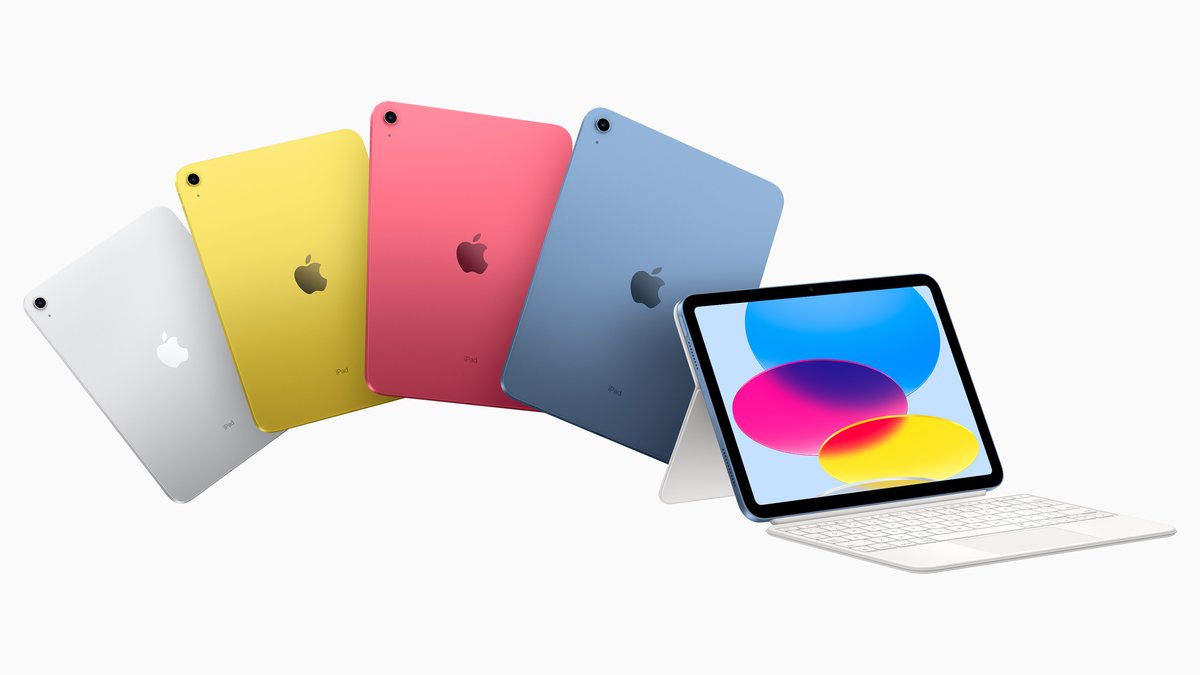
Navigating the world of Apple Pencils for your iPad 10th Gen can feel like a riddle, especially with Apple's ever-expanding lineup. You've got your sleek new iPad, ready to unlock its creative and productive potential, but figuring out which stylus plays nicely with it – and which one truly fits your needs – requires a bit more than guesswork.
This guide cuts through the confusion, offering a comprehensive, trustworthy, and genuinely useful roadmap to understanding Compatibility & Choosing the Right Pencil for iPad 10th Gen. We'll break down your options, highlight the critical differences, and help you make a confident decision that you won't regret.
At a Glance: Your iPad 10th Gen and Apple Pencils
For those eager to get straight to the facts, here's the essential intel about your iPad 10th Generation and Apple Pencils:
- Your iPad 10th Gen is unique: It features a USB-C port, but surprisingly, it doesn't work with the Apple Pencil (2nd generation) or the newer Apple Pencil Pro.
- Two Compatible Options: You have a choice between the Apple Pencil (1st generation) and the Apple Pencil (USB-C).
- The 1st Gen Catch: To use the Apple Pencil (1st generation) with your iPad 10th Gen, you must purchase a separate USB-C to Lightning Adapter. This is crucial for both pairing and charging.
- USB-C Pencil Simplicity: The Apple Pencil (USB-C) connects and charges directly via your iPad's USB-C port, no adapter needed.
- Key Feature Difference: The 1st Gen Pencil offers pressure sensitivity (great for artists). The USB-C Pencil does not have pressure sensitivity, making it better suited for note-taking and basic annotation.
- Magnetic Attachment: The USB-C Pencil magnetically attaches to your iPad 10th Gen for storage, but it doesn't charge wirelessly like the 2nd Gen or Pro models do on their compatible iPads.
The Crucial First Step: Knowing Your iPad (and Why It Matters)
Before you even think about Pencils, it’s vital to confirm your exact iPad model. While you likely know you have a 10th generation, a quick check ensures you're on the right track. This small step can save you significant time and potential frustration.
How to Check Your iPad Model:
- Open the Settings app on your iPad.
- Tap on General.
- Tap on About.
- Look for "Model Name" – it should clearly state "iPad (10th generation)."
Understanding this model is paramount because Apple's stylus compatibility isn't about "newer is better" or even "USB-C means all USB-C accessories." It's about specific hardware and software integrations that make certain Pencils exclusively compatible with certain iPads. For a more comprehensive guide to identifying any iPad model, you can find an easy guide to identifying your iPad model.
The Contenders for Your iPad 10th Gen: A Closer Look
Alright, with your iPad 10th Gen confirmed, let's dive into the only two Apple Pencil models that will work for you. Each has its distinct personality, features, and quirks.
1. Apple Pencil (1st Generation): The Classic with a Twist
Released back in 2015, the original Apple Pencil set the standard for digital styluses. It offers a premium feel and precise input, but its integration with the iPad 10th Gen introduces a unique charging and pairing requirement.
Features You'll Love:
- Pressure Sensitivity: This is the big one. The 1st Gen Pencil can detect how hard you press, allowing for varied line weights and opacity in drawing and painting apps. It's indispensable for digital artists and anyone who needs expressive control.
- Tilt Sensitivity: Just like a real pencil, you can shade by tilting the Apple Pencil, offering a natural feel for sketching and adding depth.
- Low Latency: There's virtually no delay between your hand movement and the line appearing on screen, making for a smooth, natural writing and drawing experience.
The "Twist" (Charging & Pairing):
This is where things get a bit clunky for the iPad 10th Gen. The 1st Generation Apple Pencil was designed for iPads with a Lightning port. Your iPad 10th Gen, however, uses USB-C.
To charge and pair your 1st Gen Apple Pencil with your iPad 10th Gen, you absolutely must use an official USB-C to Lightning Adapter. This adapter plugs into your iPad's USB-C port, and the Pencil plugs into the adapter's Lightning port. It's a bit of a dongle situation, and it means you can't charge your Pencil and your iPad simultaneously with just one cable. For more details on managing this adapter, you can learn more about the USB-C to Lightning adapter.
Who is this for?
The 1st Gen Apple Pencil is your go-to if pressure sensitivity is non-negotiable for your creative endeavors. If you're an aspiring artist, a seasoned illustrator, or someone who values the nuance of varied line weight in their notes, this is likely your best bet, despite the adapter.
2. Apple Pencil (USB-C): The Modern, Streamlined Option
Released in 2023, the Apple Pencil (USB-C) feels like a pragmatic answer to the changing iPad landscape. It brings a more modern charging solution to your iPad 10th Gen, but at the cost of a key creative feature.
Features You'll Appreciate:
- USB-C Charging & Pairing: This is its primary advantage for the iPad 10th Gen. Simply slide back the cap and plug it directly into your iPad's USB-C port. No adapter needed, no dongle to lose.
- Magnetic Attachment for Storage: It magnetically snaps to the side of your iPad 10th Gen for convenient storage. While it doesn't charge wirelessly this way (like the 2nd Gen Pencil on compatible iPads), it keeps your Pencil secure and ready.
- Tilt Sensitivity: Similar to the 1st Gen Pencil, it supports tilt for shading effects.
- Hover (on compatible iPad Pro models): While not applicable to your iPad 10th Gen, it's worth noting this feature exists on newer Pro models.
- Low Latency: Again, a smooth, responsive experience for writing and drawing.
The Key Omission:
The biggest difference – and potential dealbreaker for some – is that the Apple Pencil (USB-C) does NOT support pressure sensitivity. This means lines will appear at a uniform thickness regardless of how hard you press.
Who is this for?
If your primary use cases are note-taking, annotating documents, signing PDFs, brainstorming, or light sketching where pressure sensitivity isn't critical, the Apple Pencil (USB-C) offers a wonderfully streamlined experience. Its direct USB-C charging is incredibly convenient for the iPad 10th Gen. If you want to explore the features of the Apple Pencil (USB-C) further, we have more details.
Why Other Apple Pencils Don't Work
It's common to wonder if the more advanced Apple Pencil (2nd generation) or the new Apple Pencil Pro might secretly work. Let's be unequivocally clear: neither the Apple Pencil (2nd generation) nor the Apple Pencil Pro is compatible with the iPad 10th Generation.
- Apple Pencil (2nd Generation): This Pencil requires an iPad with magnetic charging capabilities built into its side, which the iPad 10th Gen lacks. It's a hardware limitation.
- Apple Pencil Pro: This newest Pencil incorporates advanced features like "squeeze" and "barrel roll," along with specific hardware for haptic feedback. These capabilities are exclusive to the latest iPad Pro (M4) and iPad Air (M2) models. Your iPad 10th Gen simply doesn't have the necessary internal components to support it.
Don't spend money on these models expecting them to work with your iPad 10th Gen; you'll only be disappointed.
Making the Right Pick: What Are You Doing With It?
Now for the ultimate decision: Which one is right for you? It boils down to your primary use case and how much you value certain features over convenience.
Scenario 1: Basic Note-Taking, Annotating, & Productivity
- Your Need: You want to write legible notes in meetings or lectures, highlight important passages in textbooks, sign digital documents, or quickly sketch out ideas. Pressure sensitivity isn't a high priority.
- Our Recommendation: Apple Pencil (USB-C).
- Why: Its direct USB-C charging and pairing are a huge convenience for the iPad 10th Gen. You avoid the adapter hassle entirely. While it lacks pressure sensitivity, this feature is often overkill for pure note-taking, where consistent line weight can even be desirable for readability.
Scenario 2: Serious Drawing, Digital Art, & Expressive Sketching
- Your Need: You plan to use your iPad 10th Gen as a canvas for digital art, illustrating, intricate sketching, or even detailed graphic design. You need control over line weight, shading, and a truly natural drawing feel.
- Our Recommendation: Apple Pencil (1st Generation).
- Why: Pressure sensitivity is the game-changer here. Without it, your digital artwork will lack the dynamism and nuance that mimics traditional media. While the USB-C to Lightning adapter is a minor inconvenience, it's a small price to pay for the expressive capabilities of the 1st Gen Pencil. Many artists find the adapter setup a worthy trade-off. For a deep dive into the 1st Generation Apple Pencil, check out our full review. Once you've chosen your Pencil, you'll want to discover the best apps to maximize your Apple Pencil's potential.
Scenario 3: General Usage, but Open to Both
- Your Need: You'll do a bit of everything – some notes, some light sketching, maybe a doodle or two. You value both convenience and features, and you're weighing the pros and cons.
- Our Recommendation: This is tougher, but consider your tolerance for the adapter.
- If the thought of an extra dongle for charging and pairing genuinely annoys you, go with the Apple Pencil (USB-C). You'll gain seamless charging and magnetic storage.
- If you might eventually delve into more artistic pursuits or simply want the most feature-rich option available to your iPad 10th Gen, and you don't mind the adapter, the Apple Pencil (1st Generation) gives you that flexibility for future creativity.
The Adapter Life: A Necessary Evil (or a Dealbreaker?)
Let's talk more about the USB-C to Lightning Adapter for the Apple Pencil (1st Generation). This isn't just a minor accessory; it's a critical component for its functionality with the iPad 10th Gen.
- What it does: It bridges the gap between the 1st Gen Pencil's Lightning connector and your iPad 10th Gen's USB-C port. You need it to initially pair the Pencil and whenever you want to charge it.
- Where to get it: It's often sold separately, but sometimes comes bundled with new 1st Gen Pencils. Always double-check when purchasing.
- Real-world implications:
- Loss Risk: Adapters are small and easy to misplace. Keep it attached to a cable or in a dedicated spot.
- Charging Time: It charges relatively quickly, but you'll have a Pencil sticking out of your iPad while it charges.
- Port Usage: You can't use the iPad's USB-C port for anything else (like charging the iPad itself or connecting an external drive) while the Pencil is charging.
For many, the adapter is a slight annoyance they're willing to overlook for the pressure sensitivity. For others, the elegance of direct USB-C charging with the Apple Pencil (USB-C) is a compelling reason to forgo pressure sensitivity.
Beyond Apple: Third-Party Styluses – Are They Worth It?
While this guide focuses on Apple's official offerings, it's worth briefly touching on third-party styluses. Many brands offer styluses compatible with the iPad 10th Gen, often at a lower price point.
- Pros:
- Cost: Generally more affordable than Apple Pencils.
- Basic Functionality: Most offer accurate tap, swipe, and drawing capabilities.
- Cons:
- Feature Gaps: The vast majority lack pressure sensitivity, tilt sensitivity, or any of Apple's advanced features like double-tap or hover.
- Palm Rejection: While many advertise palm rejection, it's rarely as seamless and reliable as with an Apple Pencil.
- Integration: They don't integrate as deeply with iPadOS and apps as the official Pencils.
For very basic navigation or occasional marking up, a third-party stylus might suffice. However, if you want any semblance of a premium, feature-rich experience, sticking with an official Apple Pencil is almost always the superior choice for your iPad 10th Gen.
Common Questions & Clarity
Let's clear up some lingering doubts you might have.
Can I use an Apple Pencil (2nd Generation) on my iPad 10th Gen?
No, absolutely not. The iPad 10th Gen lacks the inductive charging and pairing hardware required for the 2nd Generation Apple Pencil to function.
Does the Apple Pencil Pro work with iPad 10th Gen?
No, it does not. The Apple Pencil Pro, with its advanced squeeze, barrel roll, and haptic feedback features, is only compatible with the very latest iPad Pro (M4) and iPad Air (M2) models due to specialized hardware.
Do I need an Apple Pencil for my iPad 10th Gen?
"Need" is a strong word, but if you plan on writing, drawing, annotating, or precisely interacting with your iPad beyond just finger taps, an Apple Pencil drastically enhances the experience. It transforms your tablet into a powerful creative and productive tool.
Can one Apple Pencil work with multiple iPads?
Yes, if those iPads are compatible with that specific Pencil model. For example, if you own an iPad 10th Gen and an iPad mini (5th gen), you could use the same Apple Pencil (1st generation) with both (though you'd still need the adapter for the 10th Gen). You would need to re-pair it each time you switch iPads.
What about battery life for these Pencils?
Both the 1st Gen Apple Pencil and the Apple Pencil (USB-C) offer excellent battery life, typically lasting a full day of active use. They charge quickly when plugged in, so you won't be tethered for long.
What if I upgrade my iPad later?
This is a good strategic question. If you upgrade to an iPad Air (4th or 5th gen), iPad mini (6th gen), or some iPad Pro models, you would then become compatible with the Apple Pencil (2nd generation) or even the Pro. The 1st Gen and USB-C Pencils have a more limited range of compatibility compared to the 2nd Gen and Pro models. Consider your future upgrade path if you think you'll move to a higher-end iPad in the near future. This can help you compare all Apple Pencil models side-by-side for future reference.
Your Next Steps: A Confident Choice
You're now armed with all the essential knowledge to confidently choose the right Apple Pencil for your iPad 10th Generation. There's no single "best" option, only the one that best suits your unique workflow and priorities.
To recap:
- For the Artists & Detail-Oriented: Lean towards the Apple Pencil (1st Generation). Embrace the USB-C to Lightning Adapter for pressure sensitivity and tilt.
- For the Note-Takers & Streamlined Users: Opt for the Apple Pencil (USB-C). Enjoy direct charging and magnetic storage, trading pressure sensitivity for convenience.
Consider your budget, your primary use cases, and your comfort with the adapter situation. Once you've made your choice, get ready to unlock a whole new level of interaction and productivity with your iPad 10th Gen. Dive in, create, and enjoy the precision an Apple Pencil brings to your digital canvas. For a Complete iPad 10th Generation Pencil guide, including setup and troubleshooting, look no further.