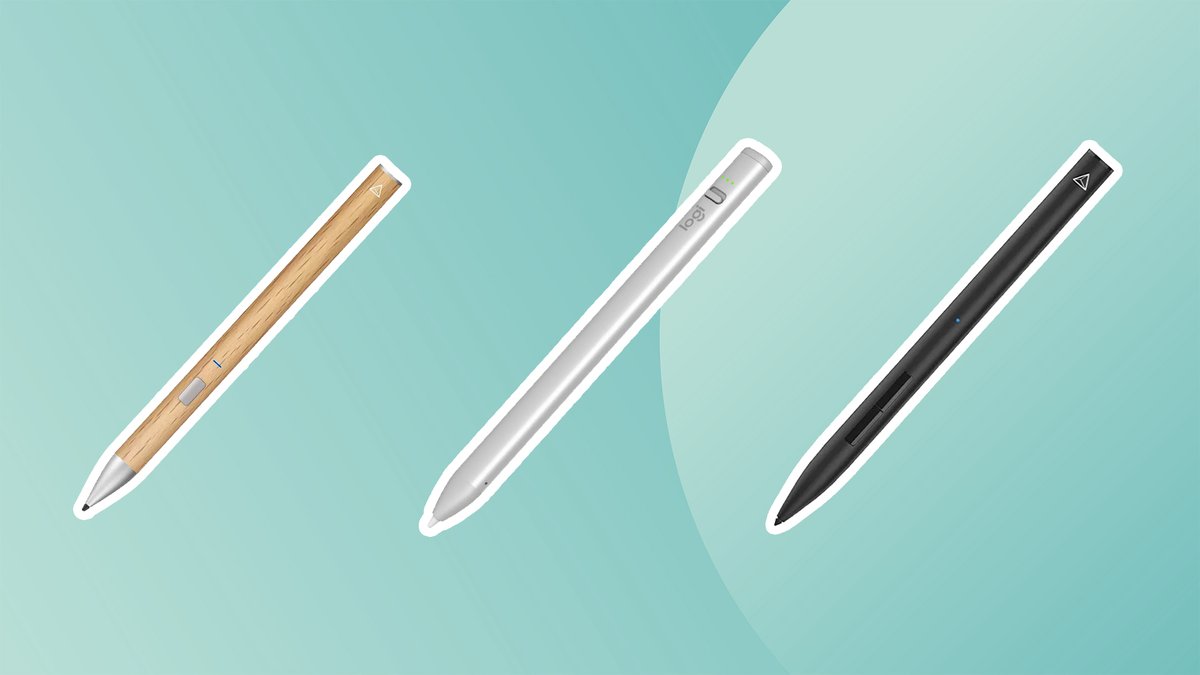
Let's be honest: The Apple Pencil is fantastic. It's the gold standard for many iPad users, offering unparalleled integration and a seamless experience. But as technology evolves, so does the competition. What if you could get 90% of the Apple Pencil's functionality, or even more tailored features for your specific workflow, without the premium price tag? Welcome to the booming world of third-party iPad styluses. They're no longer just cheap knock-offs; today's alternatives boast impressive features like magnetic wireless charging, "Find My" integration, and specialized tips, making them serious contenders for your creative or productivity toolkit.
This guide dives deep into the best Apple Pencil alternatives, comparing them feature-for-feature, and equipping you with the knowledge to choose the perfect stylus for your unique needs.
At a Glance: Why Explore Alternatives?
- Cost Savings: Significant price difference compared to official Apple Pencils.
- Innovative Features: Some alternatives offer capabilities Apple Pencils don't, like 'Find My' integration or dual tips.
- Broader Compatibility: Many work across a wider range of iPad models, including older generations.
- Customization: A growing variety of designs, charging methods, and specialized tips to fit different uses.
- Specific Needs: Tailored options for digital artists, note-takers, or casual users seeking basic navigation.
The Apple Pencil Landscape: A Quick Primer
Before we dive into alternatives, it’s helpful to understand the official Apple Pencil lineup. This context will make it easier to see where third-party options shine and what compromises, if any, you might be making.
Currently, Apple offers three main Pencils:
- Apple Pencil (1st Generation): Charges via Lightning port (plugs into your iPad's charging port or adapter). Compatible with older iPads like the iPad (6th-9th gen), older iPad Pros, and iPad mini (5th gen). Features pressure and tilt sensitivity.
- Apple Pencil (2nd Generation): Charges magnetically and wirelessly when attached to the side of compatible iPads. Features pressure and tilt sensitivity, plus a double-tap gesture for tool switching. Compatible with more recent iPad Pro, iPad Air, and iPad mini models.
- Apple Pencil (USB-C): Charges via a USB-C cable. Offers tilt sensitivity and magnetic attachment (but not charging) to compatible iPads. Lacks pressure sensitivity and the double-tap gesture of the 2nd gen. Compatible with iPad (10th gen), iPad Air (4th gen and later), iPad Pro 11-inch (all generations), and iPad Pro 12.9-inch (3rd gen and later).
Each Apple Pencil caters to different iPad models and user needs. The good news? The third-party market has stepped up to offer compelling choices across the board, often bridging gaps or adding new functionality. For instance, if you're navigating the options for the latest base model, our iPad 10th Gen Pencil guide can offer more specific insights, but this article casts a wider net.
Top Third-Party Apple Pencil Alternatives for Every Need
The market for iPad styluses has exploded, offering sophisticated features at often half the price of an Apple Pencil. Here's a rundown of the best options available today, designed to help you find your perfect match.
Best for Digital Artists & Professionals
Metapen Pencil A14: The M2/M4 Compatible Artist's Pick
If you're a digital artist wielding a new M2 iPad Air or M4 iPad Pro, the Metapen Pencil A14 is a standout. This model is specifically designed to address the updated charging magnet configuration on these latest iPads, ensuring seamless magnetic wireless charging and pairing. It automatically connects and charges when snapped to your iPad, much like the Apple Pencil 2. Beyond charging, you can pair it via Bluetooth to access its App Switcher, monitor battery life, and utilize handy shortcut keys, making it a powerful tool for serious creative work.
ESR Geo iPad Pencil with FindMy App: Locate Your Creativity
The ESR Geo iPad Pencil truly sets itself apart with its integrated 'Find My' app capability. Misplaced your stylus? Just ping it from your iPhone! This isn't just a party trick; it's a genuine convenience for busy creatives. Beyond its locator feature, the ESR Geo boasts incredibly fast charging—a mere 30 minutes gives you up to 12 hours of battery life, with a clear battery indicator display. It’s particularly lauded by Procreate users for its reliable tilt-sensitivity, allowing precise control over line thickness, all wrapped up in an affordable package.
Adonit Note+: Pressure Sensitivity on a Budget
For illustrators and digital artists who demand pressure sensitivity without breaking the bank, the Adonit Note+ is an excellent choice. This cost-effective stylus offers greater control for varying line weights and effects, similar to the Apple Pencil's capability. It integrates programmable gestures for a personalized workflow and performs exceptionally well with popular apps like Procreate, Clip Studio, ArtStudio Pro, Zenbrush 2, and Animation Desk. The ultra-fine 1.0mm tip ensures precision without scratching your screen, and it even charges while you write, connecting simply via Bluetooth.
Adonit ADI010WH: Versatile Tilt for Creative Apps
Another strong contender from Adonit, the ADI010WH is a favorite among illustrators and digital artists who utilize a wide array of iPad apps, including Procreate, Autodesk Sketchbook, Artrage, Concepts, and Medibang. While it foregoes pressure sensitivity, it offers excellent tilt sensitivity for creating diverse line weights and artistic effects. Integrated palm rejection means you can draw comfortably without worrying about accidental screen marks, and it supports convenient magnetic charging, keeping it powered up and ready for your next masterpiece.
Best for Note-Taking & Productivity
Zagg Pro Stylus 2 (Active Dual-Tip): The Versatile Workhorse
The Zagg Pro Stylus 2 takes versatility to a new level with its active dual-tip design. On one end, you get a fine tip for pixel-perfect drawing and precise handwriting, making it ideal for detailed notes or intricate sketches. On the other, a rounded capacitive back-end tip provides smooth, effortless navigation across your iPad's interface. It's incredibly user-friendly, turning on with a simple press and automatically powering down after 15 minutes of inactivity to conserve battery. With palm rejection and tilt detection, it's compatible with any iPad 2017 or newer, attaching magnetically to iPad Pro 11 or Pro 12.9 models. Plus, its Type-C fast-charging gets you fully powered in under 1.5 hours, though it does lack pressure sensitivity.
Logitech Crayon Digital Pen: Simple, Robust, and Precise
The Logitech Crayon offers a refreshingly simple, yet highly effective, experience. With pixel-perfect precision, it delivers a natural feel whether you're drawing or jotting down notes. There's no cumbersome device pairing; it connects instantaneously to your iPad with just a flick of a switch. Its smart tip technology dynamically adjusts line thickness based on the angle at which you hold it, much like a carpenter's pencil, making it excellent for dynamic Procreate drawings or nuanced handwriting. The sleek 6.4-inch, 0.7-ounce aluminum body feels solid, and its 2-millimeter tip ensures accuracy. With a 7.5-hour battery life and a quick-charge feature that gives you 30 minutes of use after just 2 minutes of charging, it's a reliable companion.
Z-NUOJIA Stylus Pen with Palm Rejection: Ergonomic & Reliable
Designed with all-day use in mind, the Z-NUOJIA Stylus Pen is an ergonomic marvel. Crafted from aluminum with a fine, wear-resistant 1.5mm nib, it promises durability and precision. This stylus boasts a suite of essential features for productivity: magnetic attachment for easy storage, excellent palm rejection, tilt sensitivity, and a convenient double-tap switching function. Users report a smooth experience free from screen scratches, lags, misalignment, or broken lines, making it an ideal tool for students, professionals giving office presentations, and anyone who needs a dependable writing and drawing instrument.
Adonit Neo with Palm Rejection: Sleek & Always Ready
The Adonit Neo strikes a balance between functionality and convenience. It magnetically attaches to your iPad, keeping it secure and easily accessible. Its native palm rejection technology means you can rest your hand on the screen comfortably while writing or drawing, without unintended marks. The spiral tip is easily replaceable, extending the stylus's lifespan. Charging is straightforward via USB-C, allowing you to power it up even while actively using it. While it doesn't offer pressure sensitivity, customers consistently praise its accuracy, thoughtful design, and solid compatibility with popular productivity apps like GoodNotes.
Best for Value & Basic Use
Metapen Pencil A8 for iPad (2018-2025): Wide Compatibility, Solid Performance
The Metapen Pencil A8 is a true workhorse for a broad range of iPads, compatible with models from 2018 right up to upcoming 2025 iPad Pro, iPad Air, and standard iPad releases. This wide compatibility ensures you won't need a new stylus if you upgrade your iPad in the near future. It features a durable pen tip and a built-in double magnet for a firmer, more secure attachment to your iPad. Highly rated for its performance with Procreate and GoodNotes, it includes essential features like palm rejection, tilt-sensitivity, and fast-charge capabilities, making it an excellent all-around option.
ANYQOO Pencil for iPad (2018-2024): Colorful & Affordable
For those seeking an even more budget-friendly alternative without sacrificing key features, the ANYQOO Pencil is a compelling choice. Compatible with iPads from 2018-2024, it offers broad usability. Available in 6 vibrant colors, you can pick one to match your style. It includes a tilt feature for dynamic line work and a precise 1.5mm fine pen tip for a natural drawing and writing experience. Users find it smooth and easy to use, and it conserves battery life by automatically switching to Sleep Mode after 10 minutes of inactivity.
Choosing Your Perfect Stylus: A Comprehensive Buying Guide
Navigating the vast array of Apple Pencil alternatives can feel overwhelming. To make the best decision, consider these key factors, aligning them with your primary use cases and iPad model.
1. Compatibility: The Golden Rule
This is, without a doubt, the most crucial factor. A stylus, no matter how feature-rich, is useless if it doesn't work with your specific iPad model.
- Check Your iPad Model: Flip your iPad over and look for the small print; it will list the model number (e.g., A2270). Cross-reference this with the stylus's stated compatibility.
- App Compatibility: While most styluses work with basic navigation, ensure advanced features (like pressure or tilt) are supported by the apps you plan to use most (e.g., Procreate, GoodNotes).
- General Compatibility: All the styluses listed in this guide are broadly compatible with iPads from 2018 or newer.
2. M4 iPad Pro & M2 iPad Air Update: A Special Note
Apple occasionally makes subtle hardware changes that can impact third-party accessories. In late 2024, Apple adjusted the internal charging magnets on the M4 iPad Pro and M2 iPad Air models to accommodate the landscape camera. This means many older Apple Pencil alternatives, even those that magnetically attach, will not charge on these specific new iPad models. If you own an M4 iPad Pro or M2 iPad Air, look for styluses explicitly stated as M4 or M2 Air compatible, or opt for USB-C charging models (like the Metapen A8) for universal charging compatibility, even if magnetic attachment is still present for storage.
3. Price: Balancing Budget and Features
Stylus prices vary widely. Generally, you shouldn't need to spend more than $100 unless you're a professional artist or designer who requires very specific, high-end features.
- Basic Use: For simple navigation, light note-taking, or occasional sketching, look in the $30-$50 range.
- Advanced Features: Styluses with features like magnetic charging, 'Find My' integration, or programmable buttons will typically fall into the $50-$90 range.
4. Pixel Precision & Control: Accuracy Matters
The responsiveness and accuracy of a stylus directly impact your experience. Poor precision leads to frustration, especially for detailed work.
- Research Reviews: Don't just rely on marketing claims. Seek out independent product reviews, particularly on platforms like YouTube, to see real-world performance demonstrations.
- Fine Tips: Look for styluses with fine tips (1.0mm-1.5mm) for precise input.
5. Pressure Sensitivity: An Artist's Essential
This feature allows you to vary line thickness and opacity by how hard you press the stylus, mimicking a traditional pen or brush.
- For Artists: If you're a digital artist or illustrator, pressure sensitivity is often essential for natural-looking strokes and expressive artwork. Confirm this feature in the technical specifications.
- For Note-Takers: For general note-taking or navigation, pressure sensitivity is less critical and can often be skipped to save costs.
6. Comfort: For the Long Haul
An ergonomic design is crucial, especially if you plan to use the stylus for extended periods.
- Shape and Grip: Consider the stylus's shape (round, hexagonal), weight, and material. Some prefer a flatter edge for grip, others a smooth, round barrel.
- Material: Aluminum, plastic, or rubberized finishes all offer different tactile experiences.
7. Responsiveness: Lag-Free Experience
A good stylus responds instantly to your movements, without noticeable lag or delay.
- Read Reviews: Again, product reviews are your best friend here. Look for comments on how quickly and smoothly the stylus registers input and tracks across the screen.
- Connectivity: Bluetooth connection can sometimes be more stable than older pairing methods, but many new alternatives connect instantly without complex setup.
8. Palm Rejection: The Game Changer
This technology detects when your palm is resting on the iPad screen and filters out those accidental touches, ensuring only the stylus input is registered.
- Essential for Comfort: Palm rejection significantly enhances the user experience, allowing for a natural writing or drawing posture without fear of making stray marks or activating unintended functions. It's almost a must-have feature for any serious stylus user.
9. Magnetic Features: Convenience and Security
Similar to the Apple Pencil 2nd generation, many third-party styluses now offer magnetic attachment.
- Storage: If convenient storage and a reduced risk of losing your stylus are priorities, ensure the model supports magnetic attachment to the side of your iPad.
- Charging: Some magnetic styluses also wirelessly charge when attached, mimicking the premium experience of the Apple Pencil 2. Be mindful of the M4/M2 compatibility note mentioned above.
10. Charging Time & Battery Life: Powering Your Productivity
How long the stylus lasts on a charge and how quickly it recharges directly impacts your workflow.
- Battery Life: Look for battery life ratings that align with your typical usage. Several hours is standard, but some offer 10+ hours.
- Charging Method: USB-C charging is increasingly common and convenient. Fast-charging features can be a lifesaver for quick top-ups.
11. Extra Pen Tips: Longevity and Value
Stylus tips wear out over time, especially with frequent use.
- Check Inclusions: For more affordable options, check if the product includes replacement tips. This adds significant value and extends the life of your stylus.
- Availability: Even if not included, ensure replacement tips are readily available for purchase.
Making the Smart Choice for Your iPad
The landscape of iPad styluses has never been richer. While the Apple Pencil remains a benchmark for seamless integration, the array of third-party alternatives now offers incredible value, innovative features, and specialized functionality. Whether you're a professional artist seeking pressure sensitivity, a student needing reliable note-taking, or a casual user looking for basic navigation, there's a stylus out there perfectly suited to your needs and budget.
By carefully considering your iPad model, primary use cases, and the buying guide factors we've discussed, you can confidently select an alternative that enhances your iPad experience without compromise. Don't be afraid to step beyond the official Apple ecosystem; innovation and quality are thriving in the third-party market, ready to elevate your digital creativity and productivity.